November 12, 2026
•
Part Search
•
Philipp Descovich
Spare Parts Labeling in the Storeroom Is Three Labels, Printed From the Record
Spare parts labeling decides whether a technician takes the right part from the shelf. Three places need a label in the storeroom and at the machine, each with a code and a plain-text line, and every label comes from the material record.
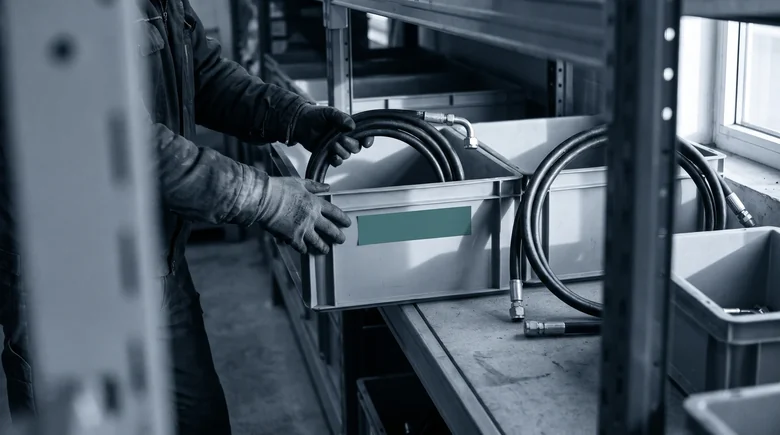
A press brake stands still because a hydraulic hose assembly has split at its fitting. The technician walks to the storeroom with the material number from the work order. Three hose assemblies sit in neighboring bins. They share a bore and differ in length and in the fitting at one end. Each bin label carries one line, the material number. The technician takes the hose from the bin whose number matches, carries it back to the machine and finds it a hand's width too short. Someone put a neighboring hose in that bin, and the label had no way to show it.
The label told the technician where the part should be. It did not say which part the technician was holding. Spare parts labeling decides whether finding the part ends at the shelf or back at the machine, and that depends on what each label carries and where it is stuck. Three places need a label, each with its own job, and every one of them can be printed from the record you already keep.
Spare parts labeling in three places
Each label answers a different question for a different moment. The bin label says what belongs in the bin. The label on the part, or on its bag, says what the part is once it has left the bin. The label on the machine says which parts belong to it.
- The bin. The code holds the material number. The plain text gives the short text, the bin location, the maker's number and the dimension that tells neighbors apart.
- The part or its bag. The code holds the material number. The plain text gives the maker's number and the same dimension.
- The machine. The code leads to the machine's parts list. The plain text names the machine and the assembly.
The short text on the bin label is the one in the record. What that text should say is the subject of a spare parts naming convention. The label prints it as the record holds it. Barcode or QR code matters less than using one code type across the whole storeroom.
The part label does the work the bin label cannot. A hose that sits in the wrong bin still carries its own number on its bag, and the mismatch shows before it reaches the machine. Where a part is too small or too oily to take a label, the bag carries it, and the part goes back into the bag after a count.
The machine label starts the search from the other end. A technician at the press brake scans it and sees the parts list for that machine. The three hoses are now one hose, because only one of them is fitted there.
Beside every code, print a line someone can read by eye. A code that only a device can read fails on the day the device is missing or the code is scratched. The plain-text line carries the maker's number and the one dimension that tells near-twins apart. For the three hoses, that is length and fitting. A technician who reads "straight fitting" on the bin while holding an elbow stops before walking back to the machine.

Take the bin labels you print next and add the plain-text line to the template before anything else changes.
When the label is gone
Labels do not last as long as parts. Hydraulic oil lifts them, a repaint covers the one on the machine, and a refit leaves a bin with a new part and an old label. The search then starts from what the part still carries.
Several clues survive the label. The maker's type code is often printed along the hose or stamped on the fitting. The machine's parts list names the assemblies fitted to it. A description in plain words, such as "high-pressure hose, straight fitting one end, elbow the other", narrows the field. A photo of the part as it is, oil and all, is the last clue when nothing printed survives. How to combine these clues into one search is the subject of identifying a spare part without a part number.
Once the part is identified, the bin gets a new label the same day, printed from the record.
Print the label from the material record
A label written by hand or typed into a label program is a second copy of the record. The record changes, the copy does not, and after a year the two disagree. The fix is to print every label from the material record itself, from the ERP or CMMS that holds it, so the label and the record carry the same text by construction. Goods receipt, counting and stock bookings stay in those systems too. The label is their output.
Printing from the record has a side effect worth keeping. A bin label that needs the maker's number and the deciding dimension cannot be printed when either field is empty. That empty field is not a printing problem. A label you cannot print is a record to complete. The storeroom manager sends it to whoever keeps the material master, and the label follows when the record is whole.
Pick one class of parts that sits in neighboring bins, such as hose assemblies, and print its labels from the record this week. Every label that refuses to print goes on a list for the master data team.
Partium Find starts from the label
Partium Find reads what your labels carry, code first. Scan a barcode or QR code to go straight to the part. A scratched code leaves the printed line. Scan the label or nameplate, and Find returns results from the text on it. Without a label, describe the part. Type what you know: a few words, a function, part of a description. Find searches by meaning, not by exact naming. The machine label leads to the parts list. Use the bill of materials to narrow down a part that is hard to name. An empty bin does not end the search. One search shows where the part is stocked, at every plant, so you find it before you buy it again. An unprintable label points to its record. When a part's record is incomplete, you complete it in Partium Cockpit: Partium Agent proposes what is missing, and your team decides. At ÖBB, labels are read on the train. At ÖBB Train Tech, technicians identify spare parts with Partium on the train, by text, label text, QR code, barcode or photo, without involving colleagues and without walking between train, workshop and warehouse.
Start this week with one aisle. Walk it and count the bins whose label would not tell two neighboring parts apart. Each of those bins needs a plain-text line, and each line needs a field in the record. To scan your own labels into Find, book a demo.
See it on a catalog like yours.
We show you Partium live, on our demo catalog or on a sample of yours.