

When customers ask for a part, delays cost you revenue.
Aftermarket spare parts search for OEMs and machine builders. Partium Find runs inside the parts portal you already have, so your parts desk, your dealers and your customers identify the part from a photo, a label or a few words. Proven at ENGEL.

The request
A part request rarely comes with a part number.
It comes as a photo, a machine number, a worn label or a few words in an email. Before anyone can quote, someone has to work out which part it is, from catalogs, drawings and parts lists.
AI Material Search · Partium Find
Five ways to find the part, right in your parts portal.
Semantic Multi-Modal Search finds the part from the words you have, even when the record behind it is messy.
Find searches your own catalog and works beside your ERP and CMMS. For OEMs, it runs as a search inside the parts portal or shop you already have.

The label
Scan the label or nameplate, and Find returns results from the text on it.

The code
Scan a barcode or QR code to go straight to the part.

A few words
Type what you know: a few words, a function, part of a description. Find searches by meaning, not by exact naming.

The bill of materials
Use the bill of materials to narrow down a part that is hard to name.

A photo
Take a photo of the part. Find matches it even when the part is worn, dirty or obfuscated.

Then narrow it
Narrow the results by manufacturer, dimensions or category.
Proven at ENGEL
Inside the parts portal ENGEL already runs.
At ENGEL, Partium’s AI-based spare part search in the ENGEL parts portal lets technicians find parts independently, with fewer part-search hotline calls, more self-served transactions in the shop, and more requests for quotes.
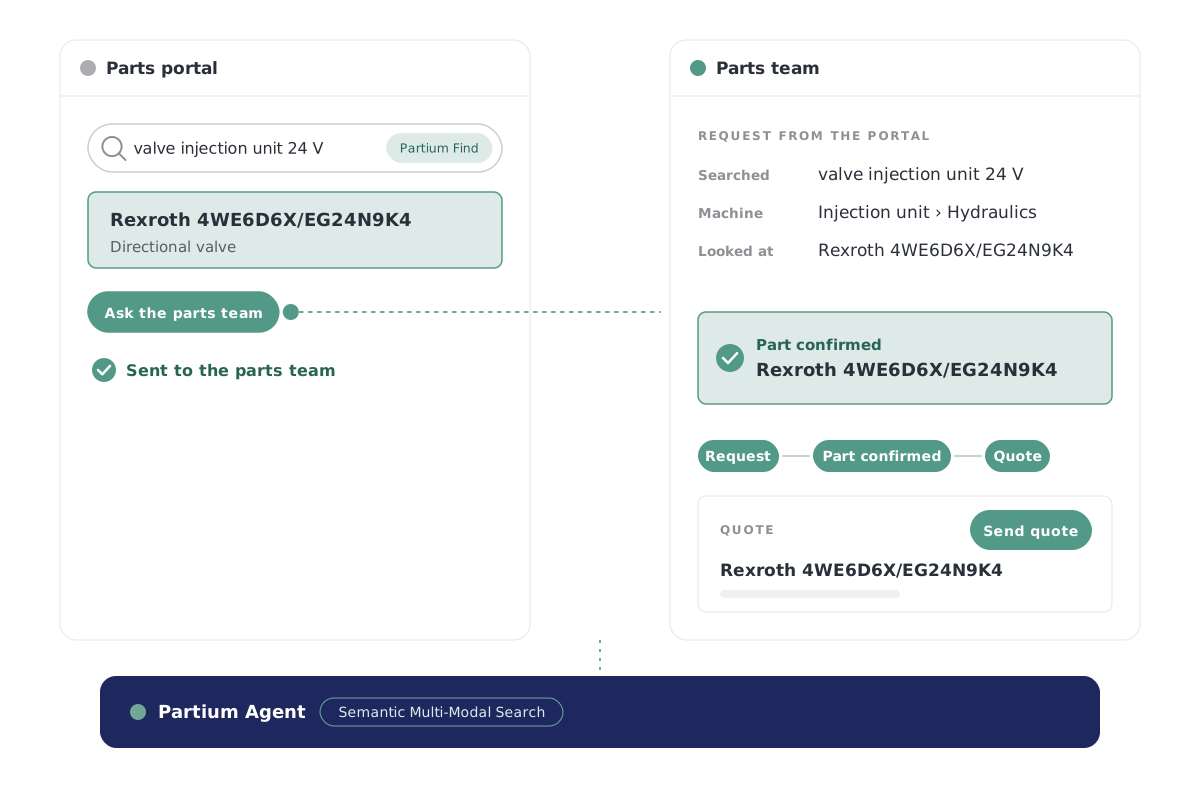
How it works
From the request to the quote, the same day.
The request comes in
A photo, a label or a few words, from the parts desk, a dealer or a customer in the portal.
The part is identified
Find searches your catalog and shows the matching part with its number.
The quote goes out
Your team spends its time on the quote, not the search, and the customer has no reason to buy elsewhere.

Spare Part Pricing · Partium Cockpit
Then price the part.
Once the part is identified, the quote needs a price.
Spare Part Pricing, in Partium Cockpit, does three things:
- Sets each spare part's price against what it should cost.
- Shows which prices sit above or below that reference.
- Reprices as the market moves.
 Explore Cockpit
The engine beneath
One engine beneath the search and the price.
Partium Agent runs beneath every feature of Cockpit and Find. You work in the product; Agent does the work underneath.
You buy Partium Cockpit, Partium Find, or both. Partium Agent comes with either and is not sold on its own.

This page draws on
Semantic Multi-Modal Search · Price Benchmark
Questions
What aftermarket teams ask.
How do I find a spare part’s number?
Take a photo of the part, scan its label or describe it in a few words. Find searches your catalog and shows the matching part with its number.
Does Find replace our parts portal?
Find searches your own catalog and works beside your ERP and CMMS. For OEMs, it runs as a search inside the parts portal or shop you already have.
How does Find relate to Partium Cockpit?
Cockpit is where your team works on the catalog, the stock and the price. Partium Find is the separate product for identifying a part in the field.
See it on your own part requests.
Book a demo, or run a demo license on your own past part requests.