November 12, 2026
•
Part Search
•
Philipp Descovich
Manufacturer Part Number: Find the Spare Part Number That Travels
A spare part often carries three numbers: the machine builder's, your plant's and the manufacturer part number. Only the maker's number holds across machines, plants and suppliers. Here is how to get to it from the number you have, and where to keep it.
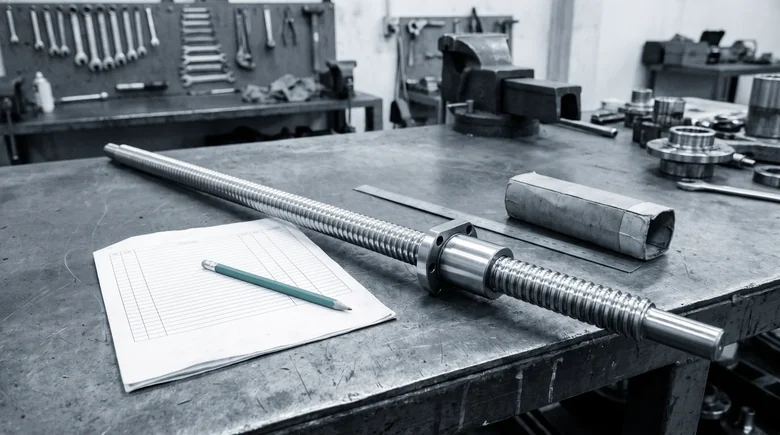
The Y axis of a machining center has developed backlash, and the ball screw is worn. Three numbers describe it. The machine builder's parts list shows the screw under an eight-digit number of the builder's own. The nut carries the component maker's type code, engraved on its flange. The plant's record holds a material number and a short text, and the field for the manufacturer part number is empty.
The buyer sends the builder's number out for a quote and gets the builder's price. The technician searches the record for the type code from the nut and finds nothing. Each number is correct, and none of them meets the other two. Identifying a spare part starts with knowing which number does which job, and a part number search works best when the record carries the manufacturer part number.
The manufacturer part number is the one that travels
Each of the three numbers is right in the place it was written. The trouble starts when a number leaves that place.

- Manufacturer part number. Written by the component maker. It holds wherever the component is used: any machine, any plant, any supplier. It fails when the maker replaces the product and the old code needs its successor.
- Machine builder's number. Written by the machine builder. It holds in that builder's parts list and at its parts desk. It fails at another machine, another builder, or a supplier who sells the component.
- Material number. Written by your plant or company. It holds in your own ERP. It fails at a supplier, and at a sister plant with a master of its own.
The manufacturer part number identifies the component wherever it is used. The builder's number identifies it inside one machine and one parts list. The material number identifies it in one plant's ERP. Only the maker's number travels between machines, plants and suppliers, so it is the one the record must carry. The other two stay useful as references: the builder's number leads from the manual to the record, and the material number keeps the requisition on the right stock.
Take one critical part on your busiest machine and write its three numbers side by side. Where one of the three is missing, you know which number to look for first.
From the number you hold to the maker's, in four steps
Most people start from the number they have, and it is rarely the maker's. Four sources lead there, roughly in order of effort. Each step ends in a check against the part in hand, because a number that fits the paperwork and not the part sends the wrong part to the machine.
- The nameplate or housing. Read the full type code. It is often longer than the label shows: the series sits on the part, while the length, the lead or the accuracy class may sit in a code on the packaging or the documentation. Check: the code's dimensions match what you measure on the part.
- The builder's parts list or documentation. Some parts lists name the maker and its number beside the builder's own, and some technical documents do so where the parts list does not. Check: the position in the list is the assembly the part came out of, for this machine's serial number.
- The builder's parts desk. Ask for the maker and the maker's number, with the machine's serial number and the parts-list position. Some desks answer with both, some with their own number only. Check: what comes back matches the code on the part.
- The maker's successor or cross-reference list. When the code is old, the maker's own lists lead from the old number to the current one. Check: the successor's dimensions and interfaces against the part in hand, since a successor is a new number and gets checked like a new part.
For the ball screw, the first step gives most of the answer. The code on the nut names the series and the lead. The full code in the documentation adds the length and the accuracy class. The parts list confirms the position on the Y axis, and the length the technician measures agrees with the full code. That is the number the record gets. Where no number survives on the part at all, the clues it still carries take over, as described in identify a spare part without a part number.
Write the four sources and their checks on one sheet at the storeroom counter, in this order, so the next request starts at step one.
Write the maker's number down once
Once found, the number belongs in the record, in a form the next person can use.
- The manufacturer part number in its own field, as the maker writes it, with no builder prefix and no dealer's order number.
- The maker's name beside it, in its own field, spelled the same way on every record.
- The builder's number as a second reference, so the parts list still leads to the record.
Written this way, the number does a second job. Two records with the same maker and number are likely one part, which is the first pass when you find duplicates in the material master. When the part is new to the plant, the same fields go in when you create the spare part in the material master, before the record goes live. With the maker's number in the record, a buyer can also ask the maker or its distribution for a quote, and OEM conversion covers when that makes sense.
Agree with your storeroom who writes the maker's number into the record when a request brings one, and in which field it goes.
Partium Find shows the part with its number
Partium Find starts from whatever the part or the paperwork offers. The nut's label is often first in reach. Scan the label or nameplate, and Find returns results from the text on it. A code on the part or its packaging saves the typing. Scan a barcode or QR code to go straight to the part. With only the builder's number, the machine narrows the search. Use the bill of materials to narrow down a part that is hard to name. A measured length or a maker's name settles between variants. Narrow the results by manufacturer, dimensions or category. Find identifies the part and leaves the record as it is. Where the record lacks the maker's number, the gap is closed in Cockpit. When a part's record is incomplete, you complete it in Partium Cockpit: Partium Agent proposes what is missing, and your team decides.
This week, pull twenty records of critical spares and count how many carry the manufacturer part number in its own field. Each record without it names a part that only one machine, one plant or one supplier can identify. To see your own catalog searched by label, code and parts list, book a demo.
Questions
What storerooms ask about part numbers.
How do I find a spare part's number?
Start from what the part and its machine still carry: the label, a code, the machine's parts list.
Take a photo of the part, scan its label or describe it in a few words. Find searches your catalog and shows the matching part with its number.
Where is the manufacturer part number on a spare part?
Usually on the part itself: a nameplate, a type code on the housing or the nut, sometimes only a series that the documentation completes. The machine builder's parts list may name it beside the builder's own number.
Scan the label or nameplate, and Find returns results from the text on it.
See it on a catalog like yours.
We show you Partium live, on our demo catalog or on a sample of yours.