The money is already in your spare parts catalog

Duplicates in the material master. Parts bought above what they should cost. Stock nobody has drawn in years. Cockpit finds all of it for maintenance and procurement, puts a figure on it, and shows the calculation next to the number.

Every month nobody looks, you pay for it again.

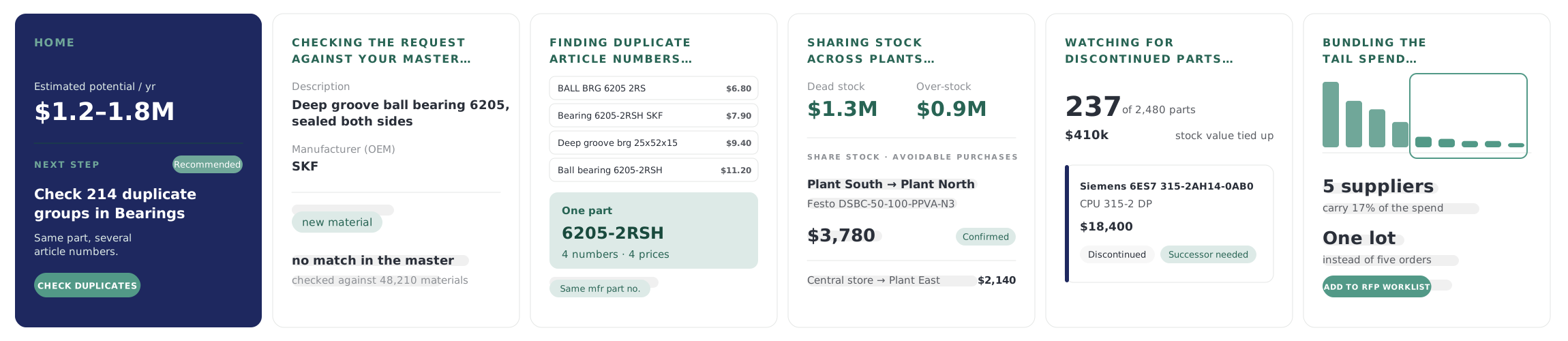
Cockpit at work: the Home screen with its recommended next step; a new part request checked against the master; duplicate article numbers found for one part; stock shared across plants; parts watched for discontinuation; the tail of the supplier spend bundled into one lot

How Cockpit works

Where the money hides,
and where you get it back

  1. Catalog

    Material Creation

    No duplicates, no half-empty records: every new part enters the catalog complete.
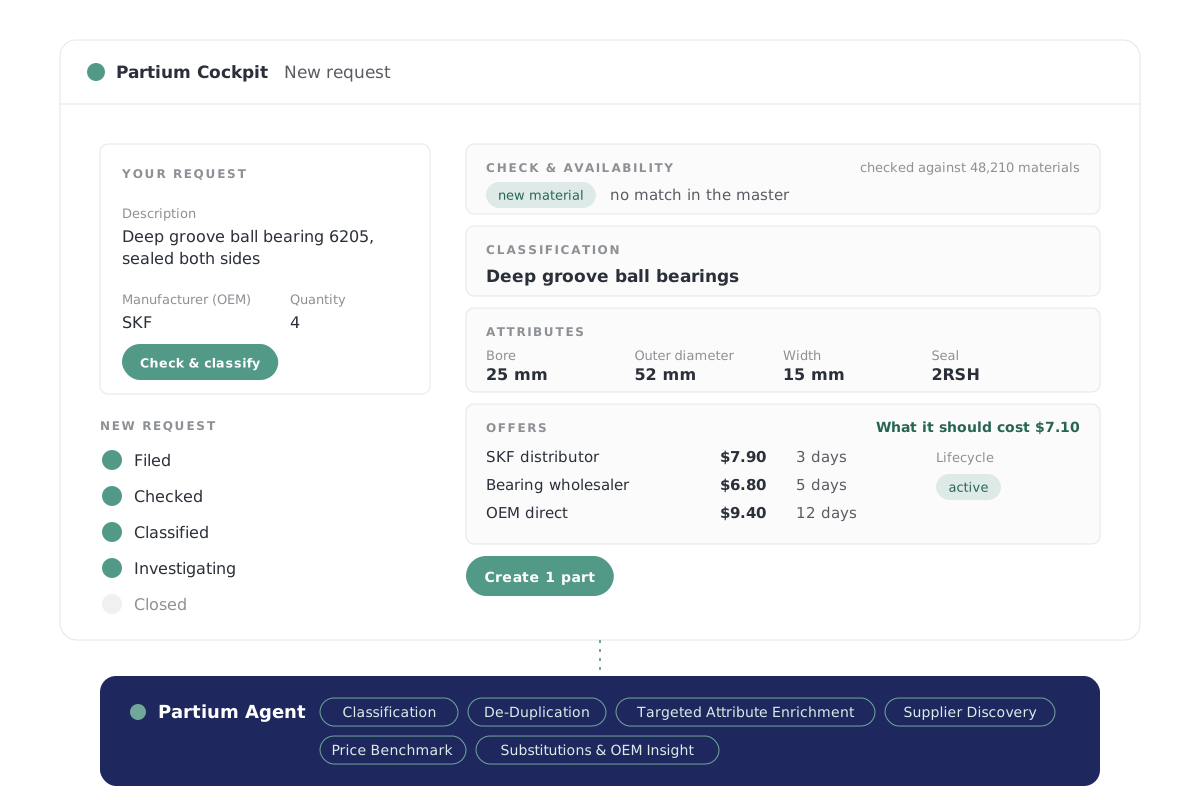
    A new part request from a description: checked against the master and found to be new, classified, its attributes filled in, its offers with price and lead time next to what it should cost, its lifecycle status, then created as one part
    1. Checks every request against your master, so a part you already have isn't created twice.
    2. Fills in the attributes the record is missing before the part goes live.
    3. Gives each new part its suppliers, lead times, a price reference and its lifecycle status.
  2. Catalog

    Duplicate Monitor

    Your material master lists one part under four article numbers, at four prices. Merge them and buy at one price.
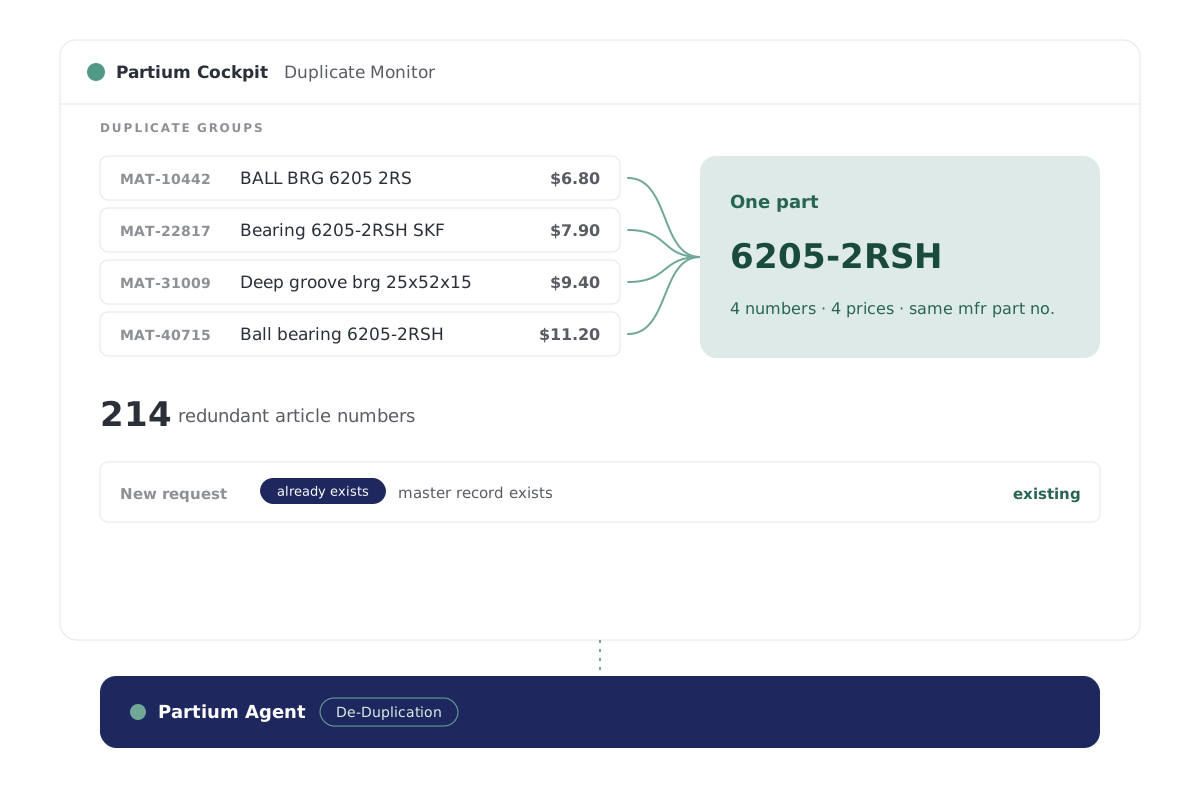
    Four article numbers at four prices for one SKF bearing, confirmed by the manufacturer part number, and a new request for it met by the record that exists.
    1. Finds the same part filed under different article numbers.
    2. Confirms each group by the manufacturer part number.
    3. Stops a new record from adding one more.
  3. Catalog

    Data Enhancement Monitor

    The AI proposes the data. Your master-data team decides.
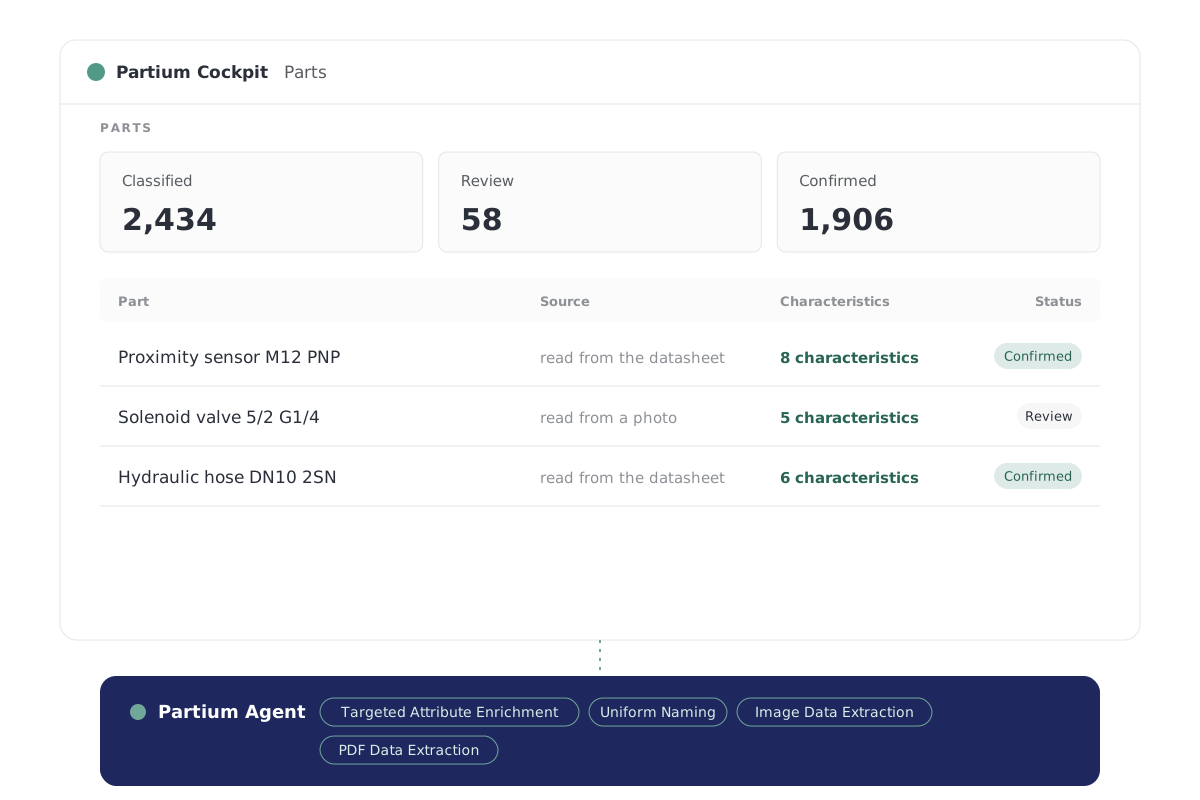
    Parts classified, in review and confirmed; each part named the same way, its characteristics filled in, some read from a datasheet or a photo.
    1. Proposes the missing attributes for each part your team adds.
    2. Reads specs from datasheets and nameplate photos into the record.
    3. Names every part the same way, so the same part always reads the same.
  4. Inventory

    Inventory Optimization

    Your shelves hold cash in dead stock. Cockpit shows how much, part by part, and your team decides what goes.
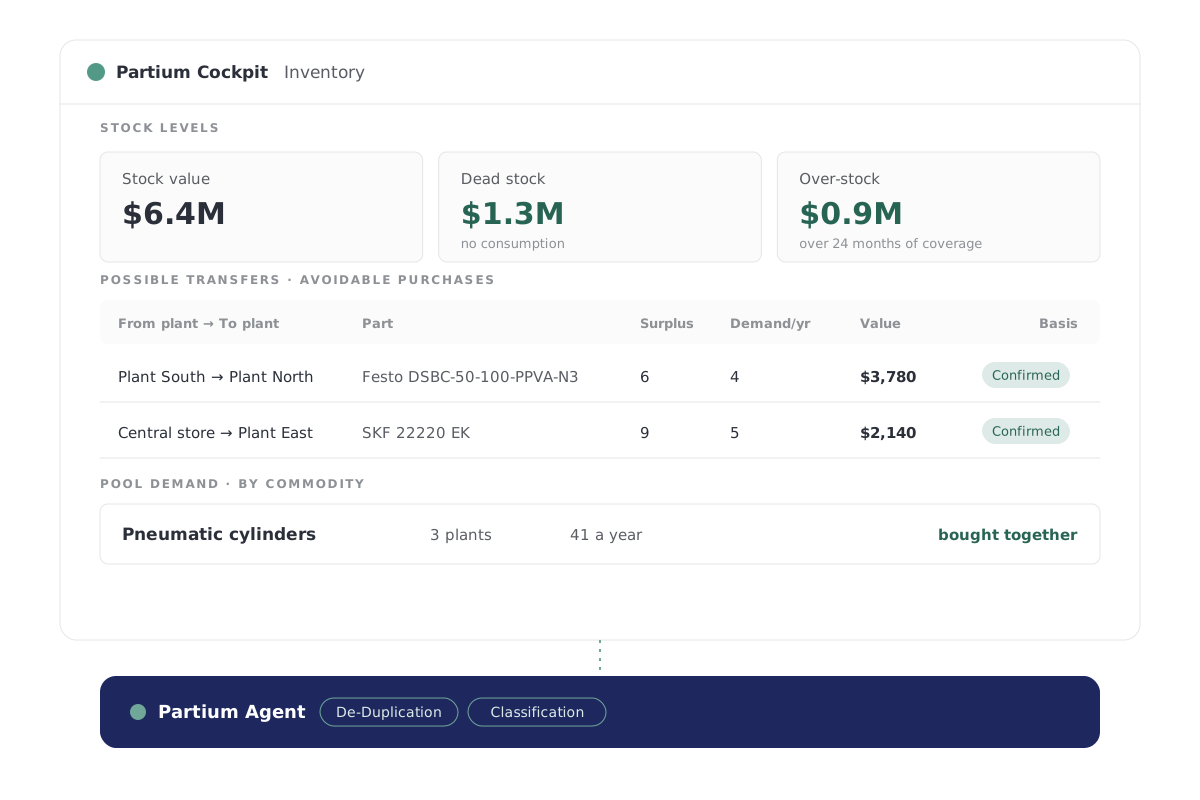
    Stock value, dead stock with no consumption and over-stock; surplus at one plant sent to the plant that uses it instead of buying it again; and the demand for one commodity pooled across plants.
    1. Shows the capital tied up in stock nobody draws, part by part.
    2. Finds the plant that needs stock another plant holds.
    3. Pools the demand for one commodity across plants, so it is bought together.
  5. Inventory

    Obsolescence Monitor

    See which parts are running out, with the date that matters, while there is time to act.
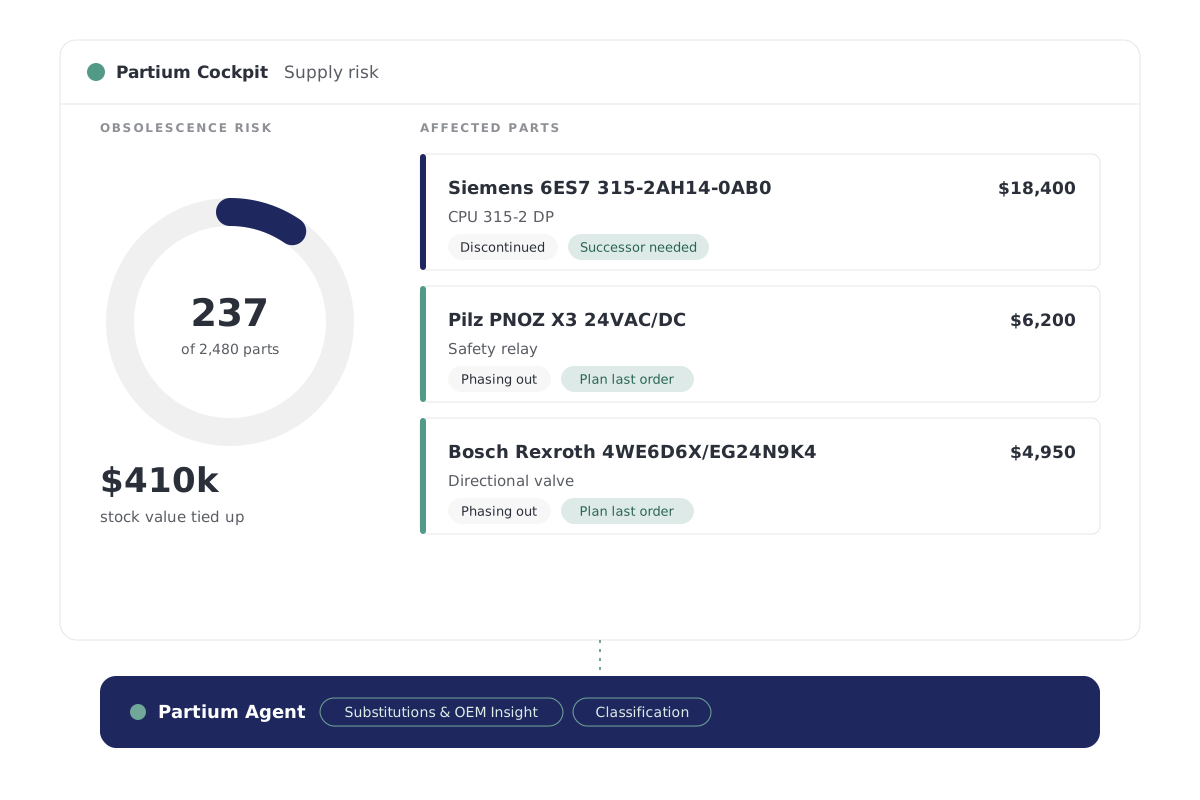
    Parts running out, each with the date that matters
    1. Shows which parts are active, phasing out or obsolete.
    2. Gives the date that matters, while there's time to plan.
    3. Names potential alternatives for parts heading for obsolescence.
  6. Purchasing

    Supplier Consolidation

    Too many suppliers for one class of parts means leverage with none of them. Cockpit shows where to consolidate.
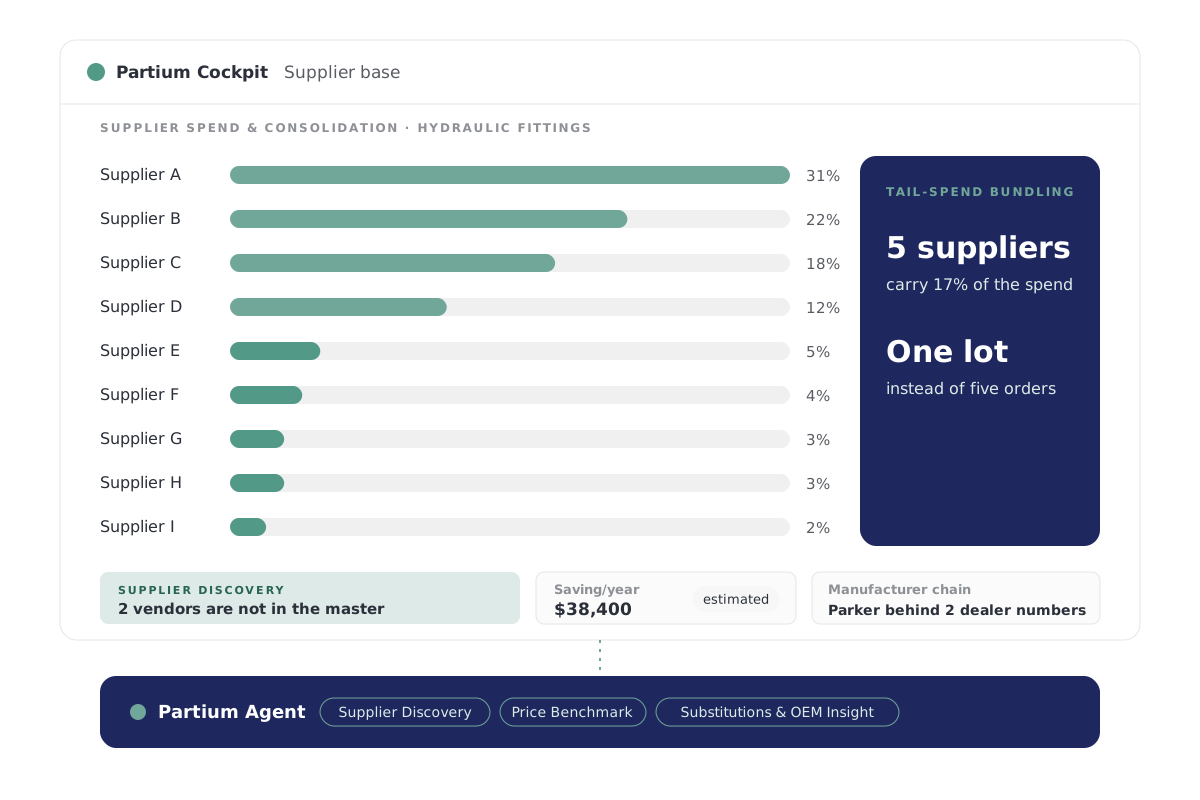
    Nine suppliers for one part class, ranked by spend, the tail bundled into one lot; vendors found that are not in the master, and the estimated saving a year.
    1. Shows how many suppliers you buy one class of parts from.
    2. Finds who else makes or sells the part, down to the OEM behind a dealer number.
    3. Estimates what you save when you pay what each part should cost.

Partium Agent runs beneath every feature of Cockpit and Find. You work in the product; Agent does the work underneath. See Partium Agent

See these features on your own catalog

For maintenance

Availability first, then price

The criticality your team sets outranks the model, so a spare the plant cannot run without is not flagged as stock to cut.

  • Inventory Optimization Shows the capital tied up in stock nobody draws, part by part.
  • Obsolescence Monitor Gives the date that matters, while there’s time to plan.
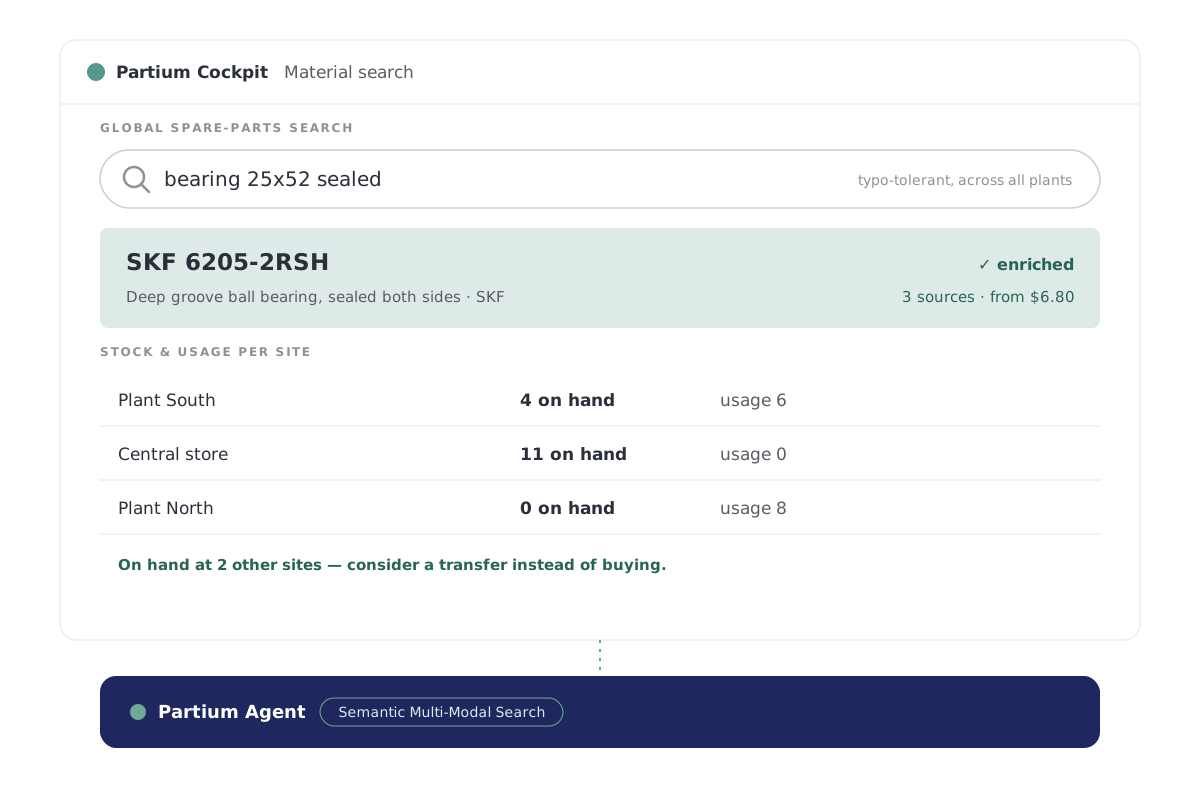
  • Material Search Shows where the part is stocked, at every plant.
A technician at a storeroom shelf checks a pump against the handheld in his hand, the production lines running behind him

Partium Agent

You work in the product. Agent does the work underneath.

Partium Agent runs beneath every feature of Cockpit and Find.

Select the parts, and Partium Agent finds their suppliers and lead times, what each should cost, and whether it is still made.

  • Material Creation
  • Material Search
  • Duplicate Monitor
  • Data Enhancement Monitor
  • Inventory Optimization
  • Obsolescence Monitor
  • Supplier Consolidation

Partium Agent

For supply chain and procurement

Pay what each part should cost

What each part should cost, and what you save when you pay that.

  • Supplier Consolidation Shows how many suppliers you buy one class of parts from.
  • Supplier Discovery Finds who else makes or sells the part, down to the OEM behind a dealer number.
  • Price Benchmark Estimates what you save when you pay what each part should cost.
A buyer marks up the item list of an RFP at a desk, the spare parts warehouse behind the glass

Questions

What teams ask about Cockpit

Who is Cockpit for?

Partium Cockpit is software for the teams who look after spare parts: maintenance and procurement. The dashboard shows what needs doing today, and the feature where you do it.

How does Cockpit relate to Partium Find and Partium Agent?

Cockpit is where your team works on the catalog, the stock and the price. Partium Find is the separate product for identifying a part in the field.

Partium Agent runs beneath every feature of Cockpit and Find. You work in the product; Agent does the work underneath.

Does the AI change our master data on its own?

No. The AI proposes the data. Your master-data team decides.

The part only goes into the catalog when your team creates it.

Will Cockpit tell us to cut a spare we cannot run without?

No. The criticality your team sets outranks the model, so a spare the plant cannot run without is not flagged as stock to cut.

How far can we trust the savings figures?

Every saving is an estimate until you pay the price, and it rests on the Price Benchmark. Every figure shows how it was calculated.

See Cockpit on your own catalog

Book a demo, or start with a demo license.

Partium Cockpit: a radar sweeping a field of part numbers, surfacing the parts that need attention